Archive for February, 2008


First impressions from Lotus Symphony

It’s been 3 days now since my resolution to drop Microsoft Office, and start working with Lotus Symphony entirely. Thought I’ll share some of my early impressions with you.

  • The work area is slightly different, since one of the toolbars is now a sidebar – takes some getting used to, but at the end, it’s more convenient to work. The relevant functions are right there, and you can control the appearance.
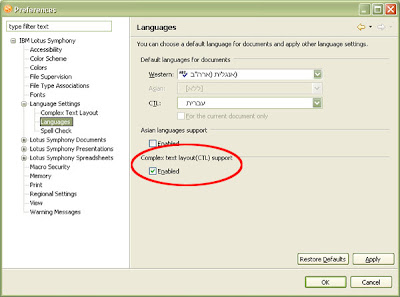
  • I’m using the Hebrew user interface, so all my new documents are set right to left (Bi-Directional, or Bidi hereafter) by default. The Bidi support is excellent so far, both in the user interface and in the document itself. However, when I created a new English document, I couldn’t find that tiny Left to Right paragraph icon. It’s available, but must be enabled from the File, Preferences screen (see screenshot). Maybe the next version will put it in the toolbar by default.
  • The sidebar can be open, float or closed. Very useful, depending what task you’re doing: open for editing/creating, float for minor adjustments or close for previewing.
  • Loading time. Both Lotus Symphony and Lotus Notes (and Lotus Sametime for that matter) are running over Eclipse, which slows things down a bit. Enabling Lotus Symphony on system startup (again, under Preferences) will open the first file faster. Once the client is up and running, things go smoother.
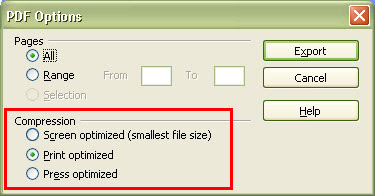
  • PDF export. One of my favorite features so far. I’ve been using the CutePDF writer software until now, which ‘Print’ your document into PDF. Now, with the export command, it’s much more easier, and you can even determine the quality of the PDF, optimizing for screen, print or press.
  • JPG export. This is super cool ! No more ‘Print screen’ and then edit in Photoshop or something. You can export your document to PDF, current page or all pages, and even decide if you want it in color of greyscale. Nice.
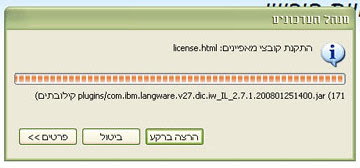
  • Install plugins. Part of the Lotus Symphony download package is the multilingual support. It comes as a .zip file, which can be added to Lotus Symphony, thanks to the Eclipse platform (screenshot). Any idea how I can switch between the interface languages? Update – figured out how to switch between languages (UI) – it depends on your Regional and Language Settings, under Start, Setting, Control Panel. Also explained here.
Lotus Symphony is turning out to be more than a suitable replacement for Office, and with almost 500,000 downloads, its getting some attention. Datamation Magazine even crowned Lotus Symphony as Office Productivity Software Product of the Year 2008, beating Microsoft Office.

In a totally different subject, thought I point you to a very interesting initiative, or experiment,
by my good friend Luis Suarez, who’s taken a step I know most of us would love to take – giving up on emails! Follow the link and read the rationale on his blog. This recent interview of Luis with IBM’s Peter Andrews on Effective Blogging, reveals Luis’s intentions. Worth the download.

Lotus Symphony – no more Office for me

New resolution people:

Starting today, I will use only Lotus Symphony for day-to-day word processing, spreadsheets and presentations. I’ve been using Lotus Symphony for some time now, in conjunction with Office, but no more. My goal is to demonstrate it’s possible to un-install MS Office, except for the ‘power’ users – those that require advanced editing features. I will post status reports on my work with Lotus Symphony, the good and the bad. I guess IdeaJam will help me push new ideas forward…

Lotus Symphony is based on Open Office suite, totally free of charge, and supports multiple languages – including Hebrew of course.
Lotus Symphony is Eclipse based, so you can add plugins and even develop your own, with the toolkit. Individuals and businesses will love the ability to export documents to PDF, straight from the box.

Coming Monday, the 18th, at SWG Community Day, I will demonstrate the full Lotus Collaboration Suite – Notes/Domino 8, with Lotus Sametime (VoIP enabled), Lotus Connections, Lotus Quickr and Lotus Symphony. Look out for the live demo at the networking area, between 14:30-15:30. My colleague, Alex, will show you how collaboration is done at IBM. How we utilize Lotus collaboration tools to >350,000 employees. How many IMs (chats) are handled a day? What people blog about? What communities they join? What web-pages they view (internal/external)? In short, it’s gonna be exciting…
Register now at ibm.com/il/news/events/community .

Feb. 12 – Safe Internet Day

Heads-up: Hebrew links coming up…

Today, Feb. 12, is the Safe Internet Day in Israel. The initiative from the Ministry of Education, along with several businesses and organizations, strives at teaching how to practice ‘safe internet’, particularly for children, who are most susceptible to the dangers of the web.
Recent technological advances have created 2 conflicting trends: 1) the internet is more accessible; 2) anonymity thrives.

Most of the people I know are contributors now, UGC providers. They blog, comment, talkback, respond, speak – everyone has something to say. You can comment in good taste or not in good taste – it depends solely on your personality. I will never talk down or insult someone on the web, no matter what he/she wrote, either on their own or as a comment.

If you know Hebrew, you’re welcome to the ‘To the Surfers’ Knowledge’ website (free translation). It’s the website of the 45-min show aired today, covering many aspects of how to practice ‘safe internet’, and what dangers lay inside the web – phishing, talkbacks (Israelies are talkbacking more than 55,000 times a day!! I had no idea), guerrilla marketing, and much more. At the Safe Internet Day website there are more links for your benefit.

I really liked this clip of Uri Gotliv, a stand-up artist hosting a late-night show in Israel. After the first episodes, some nasty comments started to surface on the show’s forum, news reviews, blogs, etc. Uri decided to fight back. Here’s the result:

5min with FuxyTunes and Mudo

There have been several announcements recently regarding Israeli hi-tech companies – either bought by large corporations or introduced what could be the next big thing in the business. Respect.

The first time I heard about 5min.com was over at Ouriel’s blog, when the company was chosen (along with 14 other) to travel to California for IsraelWebTour. I thought it’s a nice concept, making a 5min tutorial videos, but the only differentiator between YouTube for instance is that 5min.com are limiting the content in terms of time (5min max) and type (tutorial). My opinion still stands, and I guess only time will tell if I’m right or wrong. I hope I’m wrong.

On related news, Yahoo! announced earlier this week they are buying Israeli company FoxyTunes.com, which lets you control almost any media player and find lyrics, covers, videos, bios and much more with a click right from your browser. Again, Respect! I think FoxyTunes was the first extension in my Firefox – had no idea (at the time) it was an Israeli company…

Last but not least, is ModuMobile.com, from M-Systems founder Dov Moran. The company is said to introduce the next big thing in the world of mobile devices. And the short video they released to the web (excellent viral marketing example) didn’t shed more light on the mystery. Now I’m reading they will introduce their mobile solution in October 2008 – a mobile device that takes your personality where ever you go – laptop at work, mp3 in the car, GPS, media system at home, etc. Interesting.

These are only 3 examples of Israeli innovation. No wonder IBM Corporation decided to open up the Global Technology Unit (GTU) in Israel at 2001 – a corporate initiative to promote world wide business for IBM with Israeli-based technology companies. Not to mention the numerous Software and Storage acquisitions IBM made in Israel – XIV being the last one – and the excellent work IBM Haifa Research Lab are doing, both locally and worldwide.

IM-ing and virtual worlds

What the future holds for virtual worlds? will Second Life continue to reign the scene in 2008 or will other environments be introduced? maybe There.com? or Active Worlds? what business applications will flourish? and what do we want VW to do for us?
Many questions, not as many answers. Roo Reynolds and Ian Hughes have tried to answer these and other questions about virtual worlds in a recent podcast to Voices in Business blog.

One of Bob Sutor’s challenges for virtual worlds in 2008 is to allow instant messaging (IM) between virtual worlds.

Work to allow instant messaging between virtual worlds. I am “Nigel Paravane” in Second Life and I’m happy to provide that information on sutor.com or Facebook, for example, so that messages can be routed to me when I am in or out of that world.

I couldn’t agree more. As virtual worlds take center stage in 2008, the integration to real world will be crucial for survival. The opportunity is in that connections. One of the presentations at Unified Communication session at Lotusphere was given by Konrad Lagarde, Lotus Sametime development manager. Konrad showed some beta features currently being tested, that ‘may or may not be included in the future’.

Lagarde then showed his avatar running to a meeting in a virtual world. Once there, he uses a passcode to take control of the conferencing features in the room before putting up a slide show on a screen. The virtual room also was equipped with softphone voice communications and a whiteboard.

Already Lotus Sametime provides multiple services, other than the basic text chatting: integration with VoIP, integration with video conferencing systems, ability to add plugins (Eclipse based), chat outside the firewall (Sametime Gateway) and much more. Connection to Second Life is underway, and it won’t be long before you’ll be invited to a Sametime meeting, at a virtual place, with avatars representing the participants.

Links:
Bob Sutor: Seven challenges and priorities for virtual worlds in 2008
Networkworld: Lotus toying with Sametime features

« Previous Page — Next Page »