Google added some time ago a new cool feature to its Google Reader web based (of course) application, Google Trends.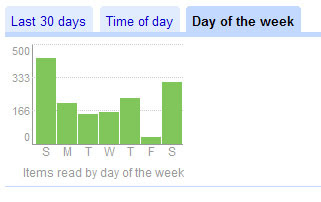
Basically, it tells you everything you want to know about your reading trends: when you read, which feeds, for how long, how many, which day/hour, etc. There are some nice graphs as well, for those who like results displayed in a colored matrix..
I copy-pasted 2 charts I feel summarize my experience so far, and those are which day and which hour I get my fix of feeds.. Surprisingly, or not, Sundays are my preferred reading days. Surprise because in Israel, Sunday is a working day, the first of the week, not part of the weekend. I can only assume that less work is getting done on Sunday.. The weekdays are roughly the same, just over 150 items per day.. I don’t read all of them, some I just scroll through
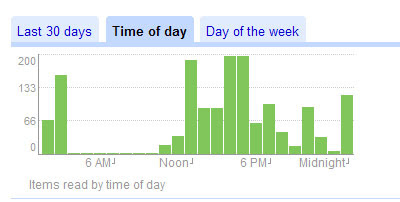 In the next chart you can see my reading hours. I would expect mornings and just after lunch, but it appears that mornings are just not my thing. Again, no surprise there as I’m not a morning person.. Noon is almost a peak, probably because I like to have some new gossip to talk about over lunch.. 🙂 Another interesting fact – I go to sleep late !! very late! It appears that I read 150 items between midnight and 2 a.m. ! wow…
Couple of action items for self, after this short analysis:
- Stop working over the weekends. The week is long enough, and my office will still be there coming Sunday. I really tend to work over the weekends, and I do want to cut it down.. not healthy.
- Go to sleep earlier. Not early, we’re not 6th graders, but earlier. Like midnight, 1 a.m at the latest. It’s hard, as my better half is usually awake, working her best in those little hours of the night, but I will make an effort.
- Working evenings. With the laptop age, that isn’t new, the office is a very relative term. It can be your office-office, your home-office, your coffee shop-office, your shopping mall-office – no end in sight.. So, for the past week or so, I decided to keep my laptop in its hand bag, and not take it out when I reach home.. Nothing is that urgent..
I’ll keep you posted on my progress.. you can call them “Mid 2Q Resolutions for a connected blogger” items. Bit long, but has a nice ring to it…